HMD has instance settings, portable wiki settings and personal preferences.
Where settings live
| Kind | Location |
|---|---|
| Instance | config.yaml in HMD_APP_DIR, or the file named by HMD_CONFIG_FILE |
| Wiki (site name, landing destination) | .wiki.yaml, in the content repository |
| Namespace (visibility, appearance, navigation, quick-create defaults) | .namespace.yaml, in the content repository |
| Personal preferences | users.json, per account |
config.yamlis strict: unknown keys stop startup. Keys are grouped underserver,git,mcp,oidcanddocument_search.- Scalar environment variables are
HMD_plus the upper-case key path with underscores:server.bindbecomesHMD_SERVER_BIND. Lists have no environment equivalent. - Environment values override file values and make their UI controls read-only.
- Exceptions and environment-only settings are in Configuration Reference.
Settings pages
Open /_/settings/server and use the System navigation:
- Server: bind address, repository directory, public origin, trusted proxies, read-only mode, upload limit, default skin, debug logging.
- Git: HTTPS remote, user, token file path, default author, branch, sync mode, poll interval.
- MCP: MCP enablement, OAuth enablement, dynamic registration, insecure-loopback development, administrator delegation.
- OIDC single sign-on: non-secret provider and admission settings, including the client secret file path.
- Document search: Tika endpoint, model and storage directories.
- Wiki: site name, landing destination, re-run setup.
- Users: accounts and scopes.
- Environment overrides: effective overrides and configuration export. Secrets are never exported.
Each setting has an info icon showing its description, environment variable, restart requirement and storage location.
- Saving writes non-secret settings to the file.
- Git remote, sync mode, upload limit and poll interval apply immediately.
- Other changes need a restart; the Restart column in Configuration Reference lists them. A saved restart-only setting keeps its running value until then, and a Restart needed banner links to each one.
- Shut down (in the banner or the top-bar menu) stops HMD gracefully. It only comes back if a supervisor restarts it, such as Docker with
restart: unless-stoppedor systemd withRestart=always. - OAuth settings need a restart. While OAuth is enabled, changing
server.base_urlalso needs one; live issuer changes are rejected.
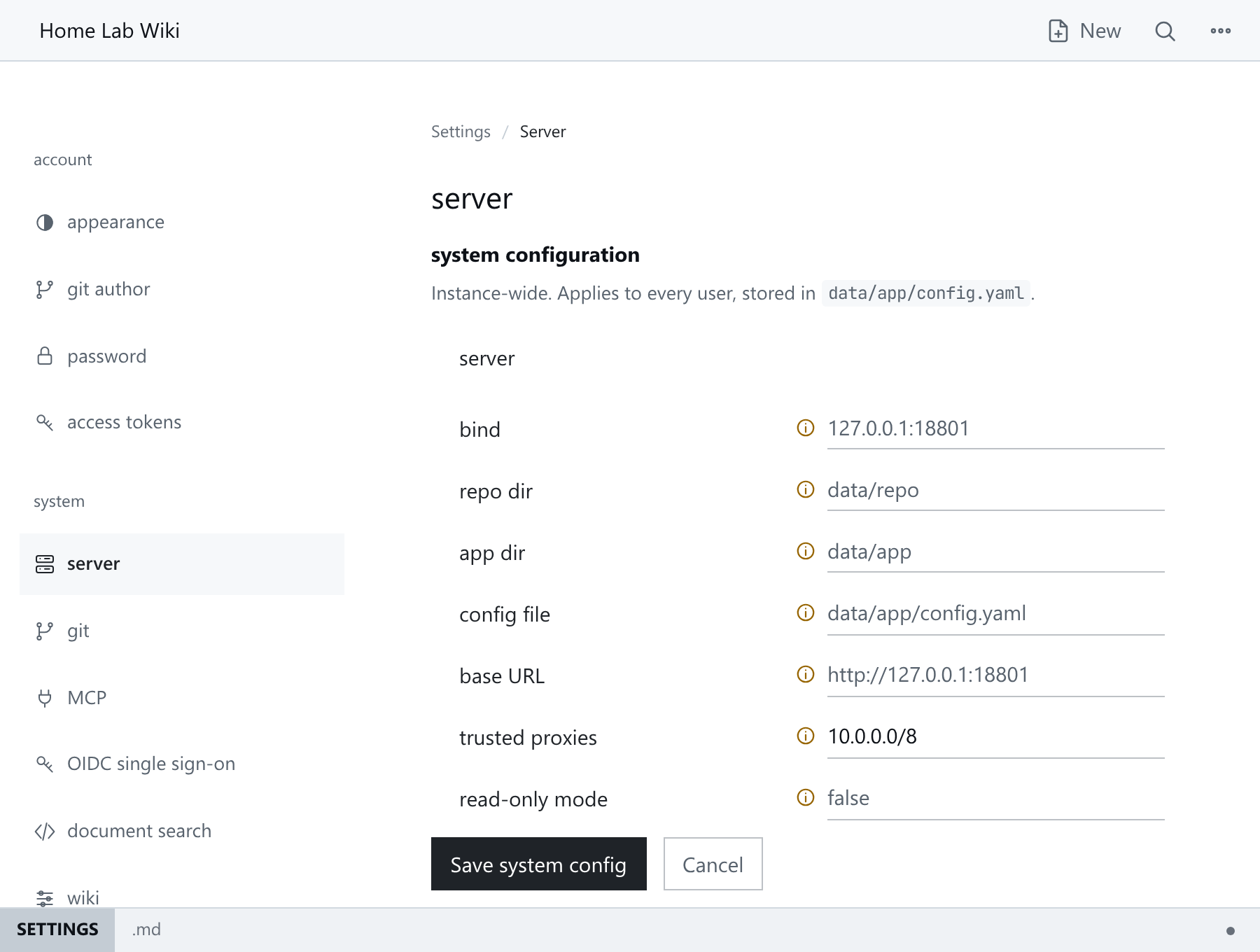
Read-only mode
Set HMD_SERVER_READ_ONLY=true to block saving pages, uploads, setup and all settings saves. Settings stay visible.
-
Users with write access can still open the editor to try it, but it has no Save and nothing they type is kept.
-
Appearance still works: skin, palette and fonts are kept in that browser, not on the server.
-
Environment only: a
server.read_onlykey inconfig.yamlstops HMD at startup. -
To restore writes, unset it and restart.
-
Application state and remote snapshots still need writable private storage. See Git Sync.
Document extraction (opt-in)
- Run a private Apache Tika Server.
- Set
document_search.tika_urlon the Document search page, or withHMD_DOCUMENT_SEARCH_TIKA_URL. - Restart.
- At startup HMD waits up to
server.tika_timeoutseconds (120 by default) for Tika, then exits if it never answers. - The search index and downloaded embedding model are stored under
HMD_APP_DIRby default. - Extraction is serialised, times out after 60 seconds, skips embedded documents and accepts at most 8 MiB of extracted text.
- These limits do not bound Tika's memory or CPU. Run it in a separate, private, resource-bounded sandbox. The bundled Compose file has a
documentsprofile.
Secrets
Git and OIDC secrets cannot be stored in config.yaml or edited in the UI.
| Secret | Environment variable | File key |
|---|---|---|
| Git token | HMD_GIT_TOKEN |
git.token_file |
| OIDC client secret | HMD_OIDC_CLIENT_SECRET |
oidc.client_secret_file |
- A
git.tokenkey is ignored. Anoidc.client_secretkey makes the file fail to load. - Keep account state,
oauth.json, configuration, secret files and backups private. OAuth state holds client registrations, grants and token records. - Secret file ownership, permissions and size rules are in Configuration Reference.
- Never paste a secret into a screenshot or commit it with the content repository.